Indexly Organizer – Intelligent File Organization
Categories:
Overview
The Indexly Organizer is a modern, intelligent file organization engine built for users who prioritize safety, transparency, and long-term traceability. It reorganizes files using a controlled plan → validate → apply workflow, allowing files to be observed as they are being organized through configurable file observers, ensuring every action is explainable, auditable, and reversible.
Unlike traditional tools that immediately move files, Indexly preserves full traceability, supports optional automatic backups, and generates structured JSON logs that can later be analyzed with the Lister command. This makes it ideal not only for everyday cleanup, but also for compliance-driven, regulated, and repeatable workflows.
At its core, the Organizer uses profile-based classification rules to place files into meaningful, real-world structures instead of arbitrary folders. This approach makes it suitable for professional environments such as business, healthcare, education, IT operations, research, and data projects, where accountability and clarity matter.
Basic Usage
indexly organize <folder>
This organizes the given folder using default rules (by extension-based categories).
Sorting Modes
You can control how files are organized using --sort-by:
indexly organize Downloads --sort-by date
Supported modes:
| Mode | Behavior |
|---|---|
date |
Groups files by year/month |
name |
Alphabetical grouping |
extension |
Category-based folders (default) |
Backup While Organizing
Organizer can copy files before moving them, ensuring reversibility:
indexly organize Downloads --backup D:\organizer-backups
Behavior:
- Files are copied to the backup directory before reorganization
- Directory structure is preserved
- Backup is non-destructive and optional
Recommended for first-time runs or production folders.
Logging System
Each organizer run generates a structured JSON log containing:
- File path (before / after)
- Category
- Extension
- Timestamps
- Duplicate detection flags
- Executor metadata
Default log location:
<organized-folder>/log/
Custom log directory:
indexly organize Downloads --log-dir D:\logs\indexly
Executor Metadata
You can annotate organizer runs with an executor name:
indexly organize Downloads --executed-by "cleanup-script"
This is stored in logs and useful for:
- Automation audits
- Multi-user environments
- CI / scheduled tasks
Integrated Lister Mode
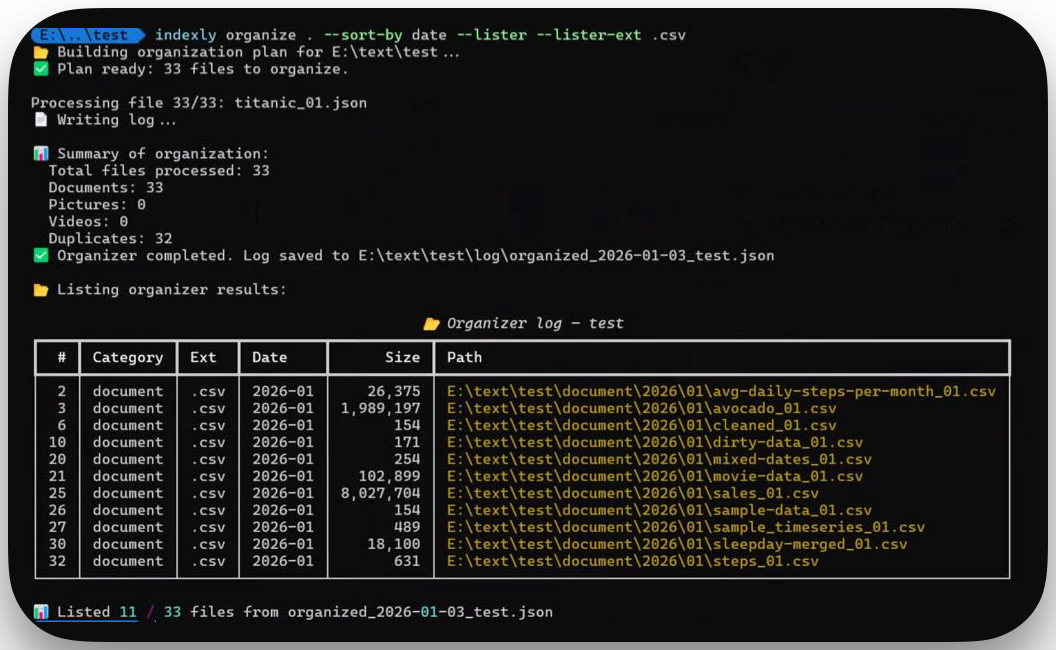
Organizer can immediately list results after organizing using the generated log:
indexly organize Downloads --lister
With filters:
indexly organize Downloads --lister --lister-ext .pdf
Supported filters:
--lister-ext--lister-category--lister-date--lister-duplicates
This avoids manual log inspection and enables fast verification.
Duplicate Detection
Organizer automatically detects duplicate files using:
- File name
- Size
- Content hash (where applicable)
Duplicates are not deleted automatically.
Instead:
- They are flagged in logs
- Can be reviewed using Lister
indexly organize Downloads --lister-duplicates
This design prevents accidental data loss.
Typical Workflows
Safe Cleanup
indexly organize Downloads --backup D:\backup --lister
Monthly Maintenance
indexly organize Documents --sort-by date --executed-by "monthly-task"
Audit + Review
indexly organize Shared --lister-category Images
Design Philosophy
Organizer follows three core principles:
- Never destructive by default
- Everything is logged
- Every action is reversible
This makes it suitable for both personal use and enterprise environments.
Next: Lister
The Organizer is designed to pair with Lister, which allows:
- Searching logs
- Filtering historical runs
- Finding duplicates across time
➡️ Continue with Lister Documentation