Lister – Analyze Organized Files & Detect Duplicates
🔎 Lister
The Lister is Indexly’s read-only inspection tool. It analyzes Organizer-generated JSON logs to help you audit, filter, and detect duplicates—without touching your filesystem.
It is designed for:
- Verifying what Organizer did
- Auditing large directories
- Detecting duplicates safely
- Post-organization reporting
🛡️ Lister never modifies files. It only reads logs.
🧠 How Lister Works
- Organizer runs and creates a structured JSON log
- Lister reads:
- A single log file or
- A directory containing multiple logs
- Filters and analysis are applied in-memory
- Results are printed to the terminal
🧩 Log Discovery & Read-Only Fallback
Lister is log-first — but it is no longer log-blocked.
When you run indexly lister, Indexly follows a smart, safe resolution strategy to ensure listing always works, even when no Organizer log exists.
Resolution order
- Cached organizer log (if available and valid)
- Organizer JSON log on disk
- Generated in-memory log (read-only fallback)
If no organizer log is found, Lister automatically switches to a read-only directory scan and synthesizes an organizer-compatible log in memory.
You’ll see a clear notice:
Organizer log not found — generating temporary organizer log (read-only scan)
No files are moved. No directories are created. Nothing is written to the filesystem.
🛡️ Read-Only Fallback Mode
Fallback mode allows Lister to operate safely on:
• Pre-organized directory trees • Legacy folders with deleted logs • Read-only or restricted locations • Deep inspection paths without Organizer access
Under the hood, Lister:
• Recursively scans the directory • Reuses Organizer’s classification logic • Reuses Organizer’s date resolution rules • Produces an organizer-compatible log structure • Feeds it into the same filtering and rendering pipeline
The result is identical output, regardless of whether the log was loaded or generated.
The predicted organization paths and filters use the same rendering pipeline in both modes. Metadata can still differ: generated fallback logs are marked as dry-run/cacheable predictions, while Organizer logs preserve the original execution metadata.
ℹ️ Generated logs exist in memory only unless caching is enabled.
Use --no-generate when you want Lister to require an existing Organizer log and exit cleanly if none is found:
indexly lister . --no-generate
⚡ Cached Re-Runs (Fast by Design)
When enabled, Lister can cache generated logs locally to avoid repeated scans on subsequent runs.
This means:
• First run: filesystem scan (read-only) • Next run: instant listing from cache • Automatic invalidation if the directory changes
Caching is:
• Safe
• Local to the inspected root
• Fully optional (--no-cache disables it)
Cache details:
• Location: .indexly/lister_cache.json inside the inspected root
• Scope: generated read-only lister results for that root
• Validation: schema, resolved root path, file count, file manifest hash, and .indexlyignore hash
• Invalidation: files added, removed, replaced, renamed, resized, timestamp-changed, or ignore rules changed
The cache bookkeeping file itself is ignored during validation so cached runs do not invalidate themselves.
🧠 Why this matters
This design makes Lister a first-class inspection tool, not just an Organizer companion.
You can now:
✔ Inspect already-organized trees ✔ Audit folders without prior logs ✔ Run Lister independently of Organizer ✔ Perform fast, repeatable read-only analysis
All while preserving Lister’s core guarantees:
- No file writes
- No filesystem mutation
- Deterministic, auditable output
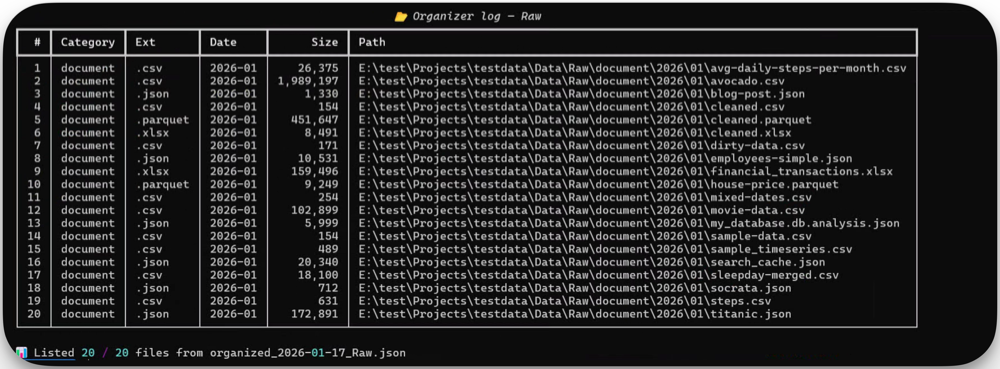
🚀 Basic Usage
indexly lister <source>
Where <source> can be:
- A single organizer log file
- A directory containing multiple logs
Examples
# List everything from a single log
indexly lister organizer_log.json

# Analyze all logs in a folder
indexly lister ./logs
🎛️ CLI Options
indexly lister --help
usage: indexly lister [-h] [--ext EXT] [--category CATEGORY]
                      [--date DATE] [--duplicates]
                      [--detect-duplicates] [--no-generate]
                      [--sort-by {date,name,extension}] [--no-cache]
                      source

positional arguments:
  source               Organizer JSON log file or directory containing logs

options:
  -h, --help           show this help message and exit
  --ext EXT            Filter by extension (e.g. .pdf)
  --category CATEGORY  Filter by category (e.g. Documents, Images)
  --date DATE          Filter by YYYY-MM
  --duplicates         Show only duplicate files
  --detect-duplicates  Hash accessible files to mark duplicates before listing
  --no-generate        Do not synthesize a fallback log when no log exists
  --sort-by            Sort by date, name, or extension
  --no-cache           Skip cached lister results
🧪 Filtering Capabilities
🔹 Filter by Extension
indexly lister logs --ext .pdf
Use cases:
- Audit PDFs only
- Validate cleanup of specific file types
🔹 Filter by Category
indexly lister logs --category Images
Categories are inferred by Organizer and typically include:
- Documents
- Images
- Videos
- Audio
- Archives
- Others
🔹 Filter by Date
indexly lister logs --date 2025-12
Shows only files processed during:
- December 2025
Useful for:
- Monthly audits
- Cleanup verification
- Historical analysis
🔹 Detect Duplicate Files
indexly lister logs --detect-duplicates
Duplicate detection is based on:
- File hashes
- Accessible file paths from the log
This allows you to:
- Identify redundant files
- Decide manually what to remove
- Avoid accidental deletion
⚠️ Lister does not delete duplicates — it only reports them.
--detect-duplicates hashes readable files and marks duplicates. It works for generated fallback logs too: Lister uses the organized target path when it exists and falls back to the original path when the target path is only a prediction.
--duplicates only filters the current listing to entries already marked as duplicates. Combine both options to hash first and show only duplicate groups:
indexly lister . --detect-duplicates --duplicates
🧩 Organizer Integration
Lister is tightly integrated with Organizer:
Run Organizer → Then Lister
indexly organize ~/Downloads --lister --lister-duplicates
What happens:
- Organizer reorganizes files
- JSON log is generated
- Lister runs automatically on that log
- Results are shown immediately
📁 Supported Input Types
| Input Type | Supported |
|---|---|
| Single JSON log | ✅ |
| Log directory | ✅ |
| Mixed logs | ✅ |
| Non-Organizer JSON | ❌ |
🪟 Windows Path Display
Lister resolves input paths before selecting logs or validating cache state. On Windows, output paths are displayed in the form stored in the Organizer log, so you may see absolute drive-letter paths, UNC paths, or generated prediction paths depending on how the log was produced.
📌 Typical Workflows
✔ Verify Organizer Results
indexly lister logs --category Documents
✔ Monthly Cleanup Audit
indexly lister logs --date 2026-01
✔ Duplicate Detection Before Manual Cleanup
indexly lister logs --duplicates
🛡️ Safety Guarantees
- ❌ No file writes
- ❌ No deletions
- ❌ No renaming
- ✅ Pure read-only analysis
Lister is safe to run on:
- Production systems
- External drives
- Network-mounted storage
🧠 Design Philosophy
Lister follows three principles:
- Transparency – show exactly what happened
- Auditability – trust logs, not assumptions
- Zero Risk – never touch real files
This makes it ideal for:
- IT audits
- Compliance checks
- Post-migration validation
➡️ Next: Backup & Restore