Indexly File & Folder Comparison – Context-Aware Diffing
Overview
Indexly provides an advanced file and folder comparison system designed for validation, auditing, and automation workflows.
It fits naturally into the Indexly pipeline:
Organize 🗂️ → Validate/List 📋 → Backup 💾 → Index 📦 → Search 🔍 → Tag & Filter 🏷️ → Compare 📑 → Export 🧾
Core capabilities include:
- Compare single files or entire folders
- Automatic text vs binary detection
- GitHub-style diffs with color semantics
- Similarity scoring for near-identical files
- Context folding for large unchanged blocks
- JSON output for automation and scripting
- Reliable exit codes for CI/CD usage
💡 Use Compare to verify changes before tagging, exporting, or backing up data.
CLI Usage
indexly compare path_a [path_b] [OPTIONS]
Options
| Option | Description |
|---|---|
--threshold THRESHOLD |
Similarity tolerance / maximum difference (0.0 exact, 1.0 very loose) |
--context CONTEXT |
Unchanged lines shown around diffs (default: 3) |
--extensions EXTENSIONS |
Comma-separated extensions to include (.json,.md) |
--ignore IGNORE |
Comma-separated names/paths to ignore in addition to .indexlyignore |
--ignore-file PATH |
Use an explicit ignore file instead of folder-local .indexlyignore |
--no-project-ignore |
Disable automatic .indexlyignore / preset ignore loading |
--full-diff |
Scan all lines for large text files while keeping diff output bounded |
--summary-only |
Folder summary without per-file diffs |
--json |
Output full comparison as JSON |
--quiet |
Suppress output (use exit code only) |
If path_b is omitted, Indexly compares path_a with a same-named file or folder in the current directory. It refuses ambiguous cases, including comparing a path to itself.
Exit Codes
| Code | Meaning |
|---|---|
| 0 | Files/folders are identical |
| 1 | Differences detected |
| 2 | Invalid comparison or input error |
⚙️ Recommended for automation:
--quiet+ exit codes.
Comparing Files
Basic File Comparison
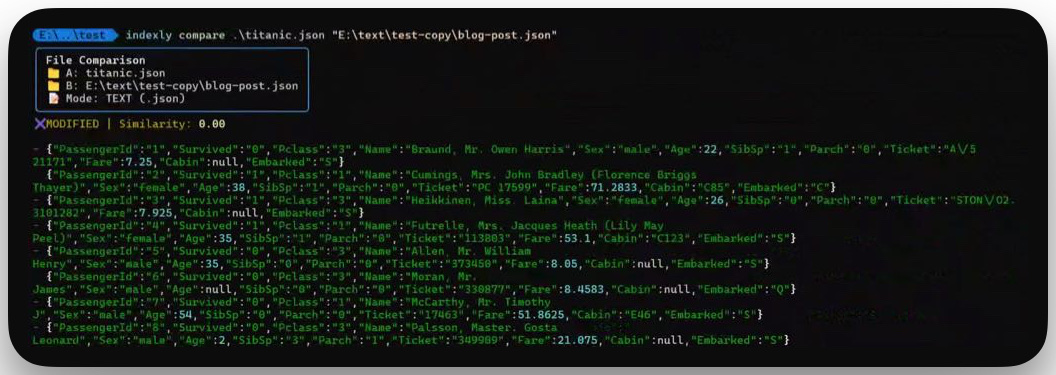
indexly compare blog-post.json "E:/text/test/data/titanic_01.json"
Output (trimmed):
File Comparison
📁 A: blog-post.json
📁 B: E:/text/test/data/titanic_01.json
📝 Mode: TEXT (.json)

✖ MODIFIED | Similarity: 0.00

-           "item": "Batteries",
-           "quantity": 1,
-           "unit": "pack"
+ {"PassengerId":"1","Survived":"0","Pclass":"3", ... }
+ {"PassengerId":"2","Survived":"1","Pclass":"1", ... }
Diff Semantics
| Symbol | Meaning |
|---|---|
- |
Removed line |
+ |
Added line |
|
Unchanged context |
Context Folding
Large unchanged blocks are automatically collapsed. For very large text files, Indexly protects the CLI from expensive whole-file similarity and unified diff generation by switching to a bounded streaming line preview. --context controls how many unchanged lines are included around each previewed change. Use --full-diff when you want Indexly to scan the whole large file line-by-line while still keeping terminal output bounded.
Example:
- removed line 1
- removed line 2
[dim]… 94 lines hidden[/dim]
+ added line 1
+ added line 2
Custom Context
indexly compare file_a.json file_b.json --context 5
indexly compare large_a.csv large_b.csv --full-diff --context 5
Shows 5 unchanged lines above and below each diff while folding larger blocks.
Comparing Folders
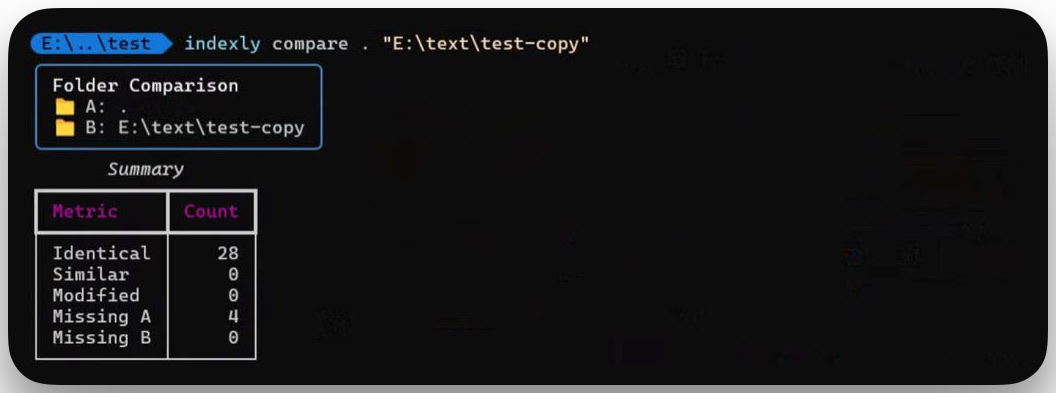
indexly compare "E:/project/folder_a" "E:/project/folder_b" --summary-only
Sample Summary
| Metric | Count |
|---|---|
| Identical | 12 |
| Similar | 3 |
| Modified | 5 |
| Missing A | 1 |
| Missing B | 2 |
Filtering Files
indexly compare folder_a folder_b --extensions .json --ignore __pycache__
indexly compare folder_a folder_b --ignore-file /path/to/.indexlyignore
indexly compare folder_a folder_b --no-project-ignore
Folder comparison automatically applies .indexlyignore rules from both comparison roots. Explicit --ignore entries are additive.
JSON Output
indexly compare file_a.json file_b.json --json
Example Structure:
{
  "path_a": "file_a.json",
  "path_b": "file_b.json",
  "tier": "TEXT",
  "identical": false,
  "similarity": 0.95,
  "diffs": [
    { "sign": "-", "text": "line removed" },
    { "sign": "+", "text": "line added" }
  ]
}
Ideal for parsing, reporting, or downstream automation.
Implementation Notes
run_compare()selects file vs folder mode and applies filterscompare_files():- Detects binary vs text
- Calculates similarity ratio
- Generates line-level diffs with folding
compare_folders():- Tracks identical, similar, modified, and missing files
- Applies
.indexlyignorerules consistently with indexing and organizer listing - Returns structured results for rendering or JSON export
- Renderers apply GitHub-style coloring and default 3-line context
Best Practices
- Run
indexly organizebefore comparing for stable paths - Use backups for critical directories
- Filter extensions for performance on large trees
- Tune
--contextfor readability vs conciseness - Use
--quiet+ exit codes in CI pipelines