Indexly File & Folder Comparison – Context-Aware Diffing
Compare files and folders using Indexly with GitHub-style diffs, similarity scoring, context folding, and JSON output.
Overview
Indexly provides an advanced file and folder comparison system designed for validation, auditing, and automation workflows.
It fits naturally into the Indexly pipeline:
Organize 🗂️ → Validate/List 📋 → Backup 💾 → Index 📦 → Search 🔍 → Tag & Filter 🏷️ → Compare 📑 → Export 🧾
Core capabilities include:
- Compare single files or entire folders
- Automatic text vs binary detection
- GitHub-style diffs with color semantics
- Similarity scoring for near-identical files
- Context folding for large unchanged blocks
- JSON output for automation and scripting
- Reliable exit codes for CI/CD usage
💡 Use Compare to verify changes before tagging, exporting, or backing up data.
CLI Usage
indexly compare path_a path_b [OPTIONS]
Options
| Option | Description |
|---|---|
--threshold THRESHOLD |
Similarity tolerance (0.0 exact, 1.0 very loose) |
--context CONTEXT |
Unchanged lines shown around diffs (default: 3) |
--extensions EXTENSIONS |
Comma-separated extensions to include (.json,.md) |
--ignore IGNORE |
Comma-separated paths to ignore (.git,__pycache__) |
--summary-only |
Folder summary without per-file diffs |
--json |
Output full comparison as JSON |
--quiet |
Suppress output (use exit code only) |
Exit Codes
| Code | Meaning |
|---|---|
| 0 | Files/folders are identical |
| 1 | Differences detected |
| 2 | Invalid comparison or input error |
⚙️ Recommended for automation:
--quiet+ exit codes.
Comparing Files
Basic File Comparison
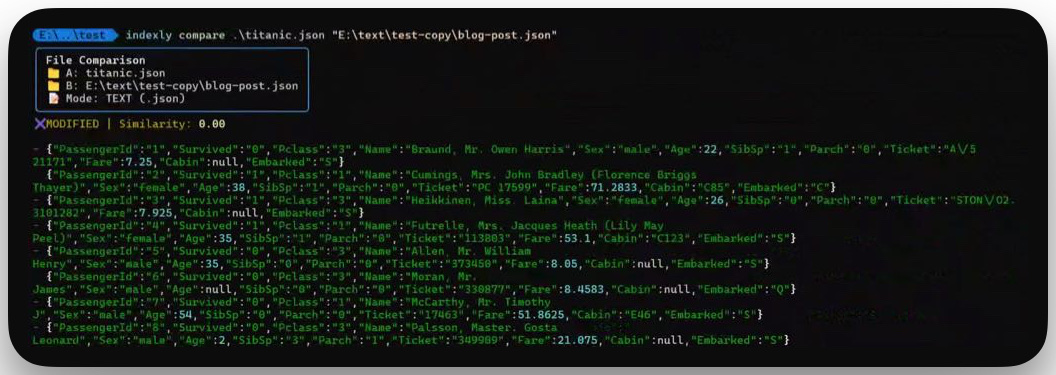
indexly compare blog-post.json "E:/text/test/data/titanic_01.json"
Output (trimmed):
File Comparison
📁 A: blog-post.json
📁 B: E:/text/test/data/titanic_01.json
📝 Mode: TEXT (.json)

✖ MODIFIED | Similarity: 0.00

-           "item": "Batteries",
-           "quantity": 1,
-           "unit": "pack"
+ {"PassengerId":"1","Survived":"0","Pclass":"3", ... }
+ {"PassengerId":"2","Survived":"1","Pclass":"1", ... }
Diff Semantics
| Symbol | Meaning |
|---|---|
- |
Removed line |
+ |
Added line |
|
Unchanged context |
Context Folding
Large unchanged blocks are automatically collapsed.
Example:
- removed line 1
- removed line 2
[dim]… 94 lines hidden[/dim]
+ added line 1
+ added line 2
Custom Context
indexly compare file_a.json file_b.json --context 5
Shows 5 unchanged lines above and below each diff while folding larger blocks.
Comparing Folders
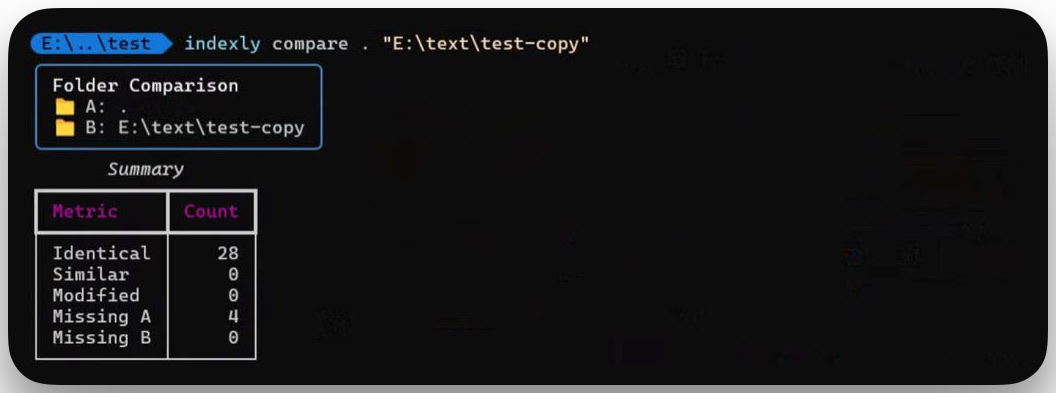
indexly compare "E:/project/folder_a" "E:/project/folder_b" --summary-only
Sample Summary
| Metric | Count |
|---|---|
| Identical | 12 |
| Similar | 3 |
| Modified | 5 |
| Missing A | 1 |
| Missing B | 2 |
Filtering Files
indexly compare folder_a folder_b --extensions .json --ignore __pycache__
JSON Output
indexly compare file_a.json file_b.json --json
Example Structure:
{
  "path_a": "file_a.json",
  "path_b": "file_b.json",
  "tier": "TEXT",
  "identical": false,
  "similarity": 0.95,
  "diffs": [
    { "sign": "-", "text": "line removed" },
    { "sign": "+", "text": "line added" }
  ]
}
Ideal for parsing, reporting, or downstream automation.
Implementation Notes
run_compare()selects file vs folder mode and applies filterscompare_files():- Detects binary vs text
- Calculates similarity ratio
- Generates line-level diffs with folding
compare_folders():- Tracks identical, similar, modified, and missing files
- Returns structured results for rendering or JSON export
- Renderers apply GitHub-style coloring and default 3-line context
Best Practices
- Run
indexly organizebefore comparing for stable paths - Use backups for critical directories
- Filter extensions for performance on large trees
- Tune
--contextfor readability vs conciseness - Use
--quiet+ exit codes in CI pipelines